CMPUT 503 Exercise 4
Apriltag Detection
Apriltag detection video
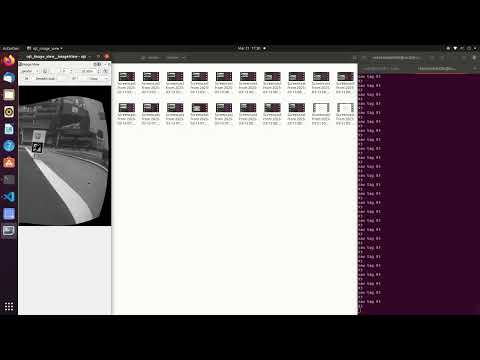
In the above video, we show that the Duckiebot is able to detect the Apriltags on the lanes. It detects the Apriltags, draws the bounding box, and puts the number deciphered near the centre of the bounding boxes. The Duckiebot is manually moved from UofA tag (93), to stop tag (21), and finally to the crossing tag (50). The images from the camera are processed and output to the /poster stream, which is shown in the screen recording above.
Image processing
For the images we receive from the camera, we first undistort the image using the previous calibration data, this is so that the distortion of the image shapes caused by the camera is mitigated. The next thing we do is to cut off the left half of the image, since the Apriltags only show up on the right side of the lane and this saves computational resources. Finally, we grey scale the image so that there are less disturbances caused by the different colours. The processed image is then passed to the Apriltag detector.
Apriltag detection rate
In our implementation, we did not include a rospy.Rate for the Apriltag detection. However, we implemented the seen_tag flag, so that the Duckiebot will detect the first seen Apriltag, and afterwards it will stop attempting to detect Apriltags. The aim of this mechanism is to avoid excessive computation and image processing for the tasks designed for this lab exercise. We also changed quad_decimate and refine_edges parameter of the Detector, so that the speed of Apriltag detection is increased.
Apriltag detection process
We used the Detector class from the dt_apriltags library, to detect Apriltags in the family of tag36h11. We set quad_decimate to be 2.0, so that image is downsampled to half its original resolution before processing, which improves detection speed. We also changed the refine_edges to be 0, so additional refinement is disabled, favoring speed over precision. The other attributes are left as default. Afterwards, we call the .detect method from the Detector to retrieve a list of the Apriltags detected. If multiple Apriltags are detected, we use the first one in the list as we assume it is the closest one to the Duckiebot.
Apriltag detection at intersection
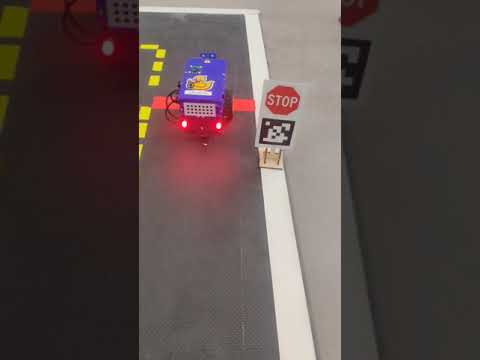
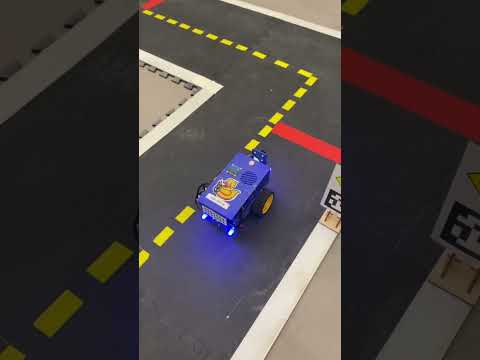
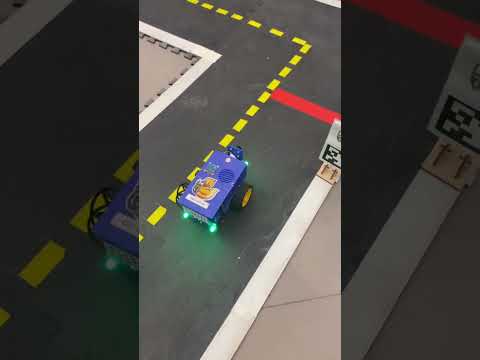
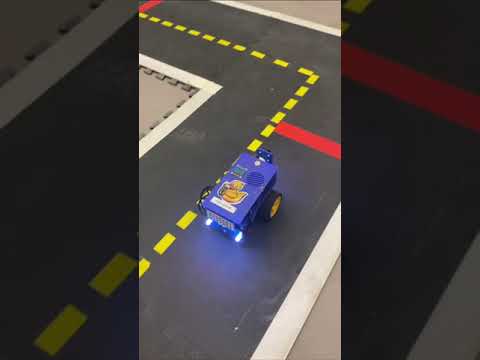
In the above videos, we show that the Duckiebot is able to detect the Apriltags on the lanes as it is moving along that lane. The Duckiebot is set to start moving at least 30 cm away from the line, attempts to detect the Apriltag, changes LED colour, stops at the red line, and moves past the red line. The mapping between the Apriltag detected, LED colour, and stopping time are:
- Stop Sign: LEDs to red. Stopping before the red line for 3 seconds.
- T-Intersection: LEDs to blue. Stopping before the red line for 2 seconds.
- UofA Tag: LEDs to green. Stopping before the red line for 1 seconds.
- No Tag: LEDs stay white. Stopping before the red line for 0.5 seconds.
In the Stop tag intersection video, the Duckiebot fails to change the light after crossing the line, but in all other videos, the lights change back to white after the line is passed.
How the Apriltag detection rate affects the intersection detection
The more frequent Apriltag detection is carried out, the more laggy the Duckiebot’s response seems to be. We find that our robot’s limited resource requires us to allocate computation effectively. Once it detects an april tag, we want the robot to focus on detect the intersection (red line); therefore, we decide to detect one AprilTag and turn off the feature once one is found. We experimented with low-frequency but continuous detection of AprilTag but that was still demanding—our bot was still slow to reacting to intersections.
Crosswalks
Video of Duckiebot crossing intersection
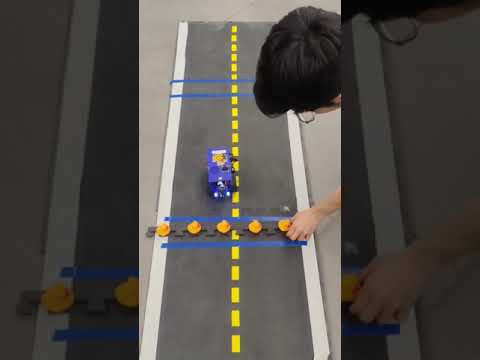
The above video shows the Duckiebot going through two blue crossings - one with no peDuckstrians and one with peDuckstrians. When the Duckiebot detects an empty intersection, it stops before the crossing for 1 second, and move straight to pass the intersection. Afterwards the Duckiebot approaches the second intersection, stops before the crossing until the peDuckstrians are removed, and continues to move straight. We used odometry for this part, so during this video the Duckiebot crossed the yellow line, which is a expected behaviour caused by discrepancies of the two wheels.
Handling double blue lines
When the Duckiebot detects a blue contour near the bottom of the image received from the camera, it updates the variable to 1 if the seen_line variable is 0. When the next time the camera callback is executed and the seen_line is 1, the Duckiebot will wait before the first blue line for 1 second. Afterwards, the seen_line is set to 2, and if the Duckiebot detects any peDuckstrians, it will stop until the peDuckstrians are gone; otherwise, it will attempt to move past the first blue line. After this, when the Duckiebot detects a blue line and the seen_line is 2, it sets the seen_line back to 0 and continue to move straight past the second blue line.
Detect the peDuckstrians
The peDuckstrians are detected by their colours. We set the lower bound and upper bound for detecting orange contours, and use the detected orange contours from the camera as peDuckstrians. In cases where there are other orange objects at the crossing detected by the Duckiebot that are not peDuckstrians, the detection method might not work well. Also, if the peDuckstrians appear without a blue line in between with the Duckiebot, the Duckiebot does not stop to detect if there are peDuckstrians on the road.
Safe Navigation
Video of lane switching
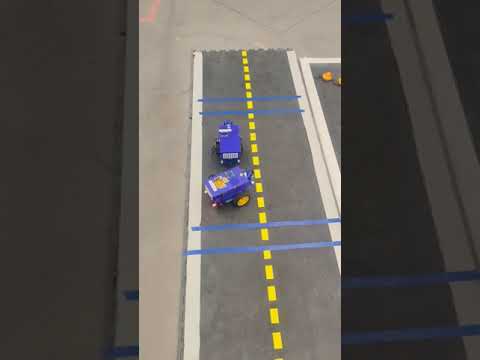
In the above video, we show our Duckiebot avoiding the parked Duckiebot by detecting the circle grid attached to the back of the Duckiebot. When the parked Duckiebot is detected, our Duckiebot turns into the other lane and moves past the other Duckiebot. Afterwards, the Duckiebot moves back to the original lane and continues to drive straight. The lane switching is implemented using odometry, but the detection of the circle grid is carried out in real-time using the camera.
Detect the broken bot
We used the findCirclesGrid from OpenCV, which is a method that detects the circle grid on the back of the broken bot. We specified that the size of the grid is (7, 3), which is 21 circular dots distributed in 3 rows and 7 columns. We also used CALIB_CB_SYMMETRIC_GRID flag since we are trying to detect a symmetric grid pattern.
Other methods tried
We tried using blob detection, but it wasn’t very straightforward, so we dropped the idea right away. We then tried Circular Grid Detection, which is what we use now, but it wasn’t working well—specifically, our bot wasn’t detecting the grids and reacting in real time. We originally undistorted the image, converted it to grayscale, and blurred it. This was a problem because the latency from the extra computation was causing slow reactions.
Maneuvering around the broken-down bot
We used simple odometry to maneuver around the idle bot. The sequence of actions is: detect while going forward, rotate, drive forward to the other lane, rotate, drive straight to pass the idle bot, rotate, return to the lane, rotate, and run. Odometry problems require odometry solutions!
Write Up
In the April Tag task, we set up the robot to detect the tags with less precision, which naturally increased the detection frequency. We also implemented it to detect only one April Tag and turn off the feature afterward because we found that this was a computationally heavier operation that affected our Duckiebot’s driving reactions (e.g., camera blob detection would suffer higher latency). This decision was made to accommodate the limited computation of our Duckiebot. If we had higher frequency or detection precision, our bot might not have stopped before the red line due to computational latency. If we wanted to use April Tags to control the robot like traffic signs, we would need a frequency correlated to the speed of the bot—as it goes faster, it needs to be sharper in detecting newly appeared traffic signs. In the case of detecting more than one April Tag, we take the first one in the detection list—the nearest and most relevant one. A challenge we face is how to allocate computational resources to perform necessary real-time requirements.
In the CrossWalk Task, we detect the peDuckstrians by finding orange contours. This detection only occurs after the bot sees the first blue line. Our computational constraints do not allow us to detect both the blue line and orange peDuckstrians in real time; therefore, the current strategy would fail if the peDuckstrians jaywalk or if the blue line becomes erased over time. We also define peDuckstrians as any orange blobs, which may cause failures due to color overfitting. This task was straightforward. If there was a barrier to completion, it would be how to properly define a duck (e.g., to not confuse yellow lane boundaries with ducks).
In the Safe Navigation task, we use regular odometry manipulation to command the bot’s wheels, like in Exercise 2. We use circle grid detection to detect the back of another Duckiebot. This real-time detection is a challenge for us. Due to lighting and natural camera latency, the Duckiebot originally had problems with real-time detection and stoppage. So we decided against undistorting the image to free up some computation, and it worked much better. Other than that, the challenges were just natural problems in the odometry task.
Overall, this was a good exercise. We learned to use the April Tag library and to synthesize vision/odometry with other auxiliary skills that we learned before to perform agile and real-time control of our Duckiebot.
References
Collaboration
- The report is a joint effort by Alex Liu and Minh Pham on the completed deliverables of the lab, including the aforementioned screenshots and video, as well as the github repository.
- Questions regarding the lab were answered by TAs of the course.
AI Usages
- ChatGPT, DeepSeek, Claude was used to reword some sentences in this report and to assist in coding.